JSON Web Tokens (JWT) Explained: How They Work, Structure, and 5 Critical Security Traps
A JSON Web Token looks like an opaque string of gibberish, but it is just three Base64URL-encoded JSON objects joined by periods. Here is how JWTs actually work, how signatures verify integrity, and the five security traps that compromise production systems.
A JSON Web Token (JWT) looks like an opaque, encrypted string of random letters and numbers:
eyJhbGciOiJIUzI1NiIsInR5cCI6IkpXVCJ9.eyJzdWIiOiIxMjM0NTY3ODkwIiwibmFtZSI6IkFsaWNlIiwicm9sZSI6ImFkbWluIiwiaWF0IjoxNTE2MjM5MDIyfQ.4S_XgLq...
The single most dangerous misconception among developers is believing that a JWT is encrypted. It is not.
Unless you are explicitly using JSON Web Encryption (JWE), standard JSON Web Tokens (JWS) are merely Base64URL-encoded and cryptographically signed. Anyone who intercepts or inspects a JWT can read every single byte of data inside it in less than a millisecond.
The power of a JWT lies not in secrecy, but in tamper-evident integrity. It allows a client to present claims to a server without requiring that server to query a database or central session store on every single HTTP request.
Here is how JWTs work under the hood, how signatures prove authenticity, and the five critical security mistakes that frequently compromise production apps.
1. Anatomy of a JWT: The Three Segments
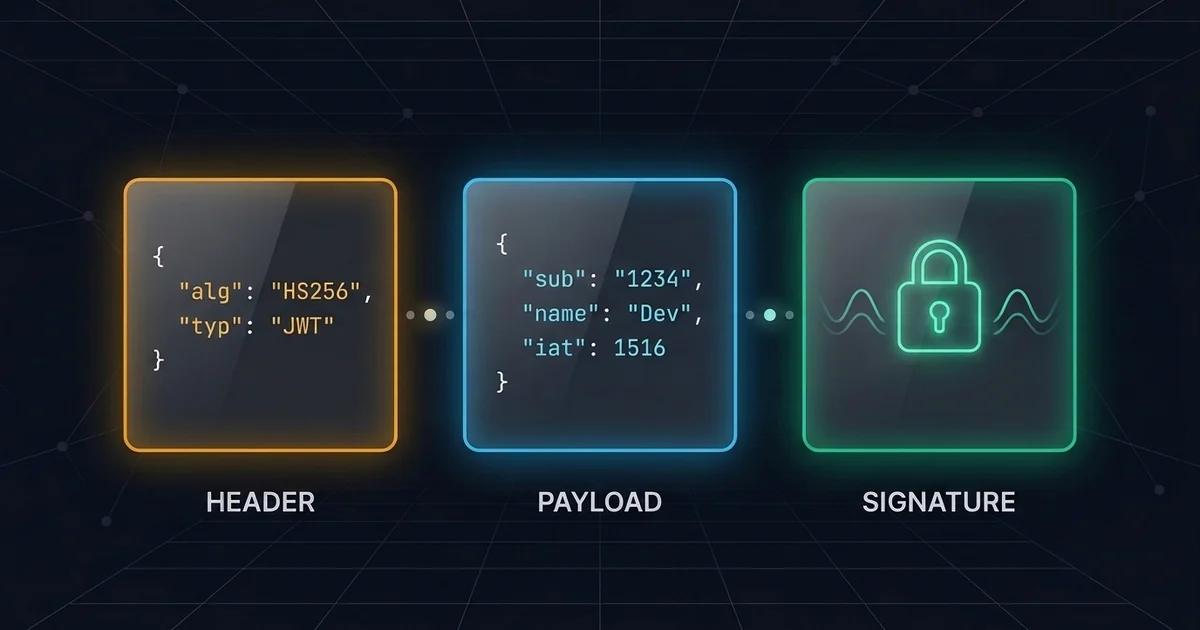
Every JWT consists of three separate components separated by periods (.):
Header . Payload . Signature
If you split a token by its periods and run the first two segments through a Base64 URL Decoder, you get human-readable JSON.
+-------------------------------------------------------+
|  Header     | Algorithm & token type                  |
|  .                                                    |
|  Payload    | Claims (user id, roles, expiration)     |
|  .                                                    |
|  Signature  | Cryptographic proof against tampering   |
+-------------------------------------------------------+
Segment 1: The Header
The header identifies which cryptographic algorithm was used to generate the signature and confirms that the payload is a JWT:
{
  "alg": "HS256",
  "typ": "JWT"
}
Common algorithms include: - HS256 (HMAC with SHA-256): A symmetric algorithm where both the issuer and the verifier share the same secret key. - RS256 (RSA Signature with SHA-256): An asymmetric algorithm where the issuer signs with a private key and consumers verify with a public key. - ES256 (ECDSA with P-256 and SHA-256): An asymmetric elliptic curve algorithm that provides equivalent security to RSA with smaller key sizes and lower CPU overhead.
Segment 2: The Payload (Claims)
The payload contains the claims—statements about an entity (typically the user) and contextual metadata.
The JWT specification (RFC 7519) reserves seven standard claims:
| Claim | Full Name | Purpose | Example |
|---|---|---|---|
iss |
Issuer | Who created the token | "https://auth.example.com" |
sub |
Subject | Unique identifier of the user/entity | "usr_98a72b14" |
aud |
Audience | Intended recipient of the token | "https://api.example.com" |
exp |
Expiration Time | Unix timestamp after which token is invalid | 1735689600 |
nbf |
Not Before | Unix timestamp before which token must not be accepted | 1735686000 |
iat |
Issued At | Unix timestamp of issuance | 1735686000 |
jti |
JWT ID | Unique identifier for one-time token tracking/revocation | "uuid-v4-token-id" |
You can also include custom application claims, such as tenant_id or user roles:
{
  "sub": "usr_98a72b14",
  "name": "Sarah Connor",
  "role": "editor",
  "iat": 1735686000,
  "exp": 1735689600
}
Pro Tip: Keep custom claims lean. Because the JWT is sent in the
Authorization: Bearer <token>header with every API request, bloated claims add unnecessary bandwidth overhead and can exceed HTTP proxy header buffer limits (commonly 8 KB).
Segment 3: The Cryptographic Signature
The signature is created by combining the encoded header and the encoded payload, hashing them with your secret or private key:
HMACSHA256(
  base64UrlEncode(header) + "." + base64UrlEncode(payload),
  secret_key
)
The signature guarantees that the header and payload have not been modified in transit. If an attacker changes "role": "editor" to "role": "admin" in the payload, the recalculation of the signature on the server will fail, and the request will be rejected.
Need to inspect a token right now? Paste your token into ToolQuilt’s free client-side JWT Decoder & Inspector to decode the header, payload, and timestamps in real time without sending your secret or token across the wire.
2. Symmetric (HS256) vs Asymmetric (RS256 / ES256)
Choosing the right signing algorithm depends entirely on your system architecture.
Symmetric (HS256):
  Auth Service [Shared Secret] ---> API Service [Shared Secret]
  (Both can sign AND verify. If the API service is compromised, attackers can mint tokens.)

Asymmetric (RS256 / ES256):
  Auth Service [Private Key (Sign)] ---> API Services [Public Key (Verify Only)]
  (API services cannot forge tokens even if fully breached.)
When to use HS256 (Symmetric)
- You have a monolithic application or a single backend service where the same codebase issues and verifies tokens.
- Simpler key management—you only need a single strong environment variable string.
When to use RS256 / ES256 (Asymmetric)
- You have a microservices architecture or third-party APIs consuming your tokens.
- Your identity provider (e.g. Keycloak, Auth0, Okta, or custom OAuth2 service) issues tokens using its private key. Microservices fetch the public key (often via a JSON Web Key Set endpoint:
/.well-known/jwks.json) and verify incoming requests without needing write access to your signing secret.
3. The 5 Critical JWT Security Traps
Trap 1: The alg: “none” Algorithm Confusion
Early JWT libraries had a catastrophic vulnerability: RFC 7519 supports unsigned tokens by setting the algorithm header to "none".
Attackers could take an existing valid token, modify the payload to grant admin permissions, set "alg": "none", strip the signature, and submit it:
{
  "alg": "none",
  "typ": "JWT"
}
If the server library blindly trusted the algorithm specified in the incoming token’s header, it would skip signature validation and accept the forged claims.
The Fix: Never allow incoming tokens to dictate which algorithm your server verifies. Explicitly enforce the expected algorithm in your verification options:
// Node.js (jsonwebtoken) - SECURE
jwt.verify(token, publicKey, { algorithms: ['RS256'] });

# Python (PyJWT) - SECURE
jwt.decode(token, public_key, algorithms=["RS256"])
Trap 2: Storing Sensitive Data in Plaintext Claims
Because JWTs look like encrypted hashes, engineers occasionally place sensitive fields into the payload:
{
  "sub": "12345",
  "email": "user@example.com",
  "credit_card_last4": "4242",
  "password_hash": "$2b$12$..." // NEVER DO THIS
}
Any user, browser extension, intermediary proxy, or logging tool can read this payload instantly. Never place passwords, internal API keys, credit card details, or sensitive personal identifiable information (PII) inside a JWT.
Trap 3: Weak HMAC Secrets
When using HS256, the security of the entire authentication boundary rests on the entropy of your secret key. Using weak secrets like my-super-secret-key-123 allows attackers to crack the key offline in minutes using GPU tools like Hashcat:
hashcat -m 16500 jwt_token.txt rockyou.txt
Once an attacker recovers your HMAC secret, they can forge valid administrative tokens at will.
The Fix: Generate high-entropy cryptographic keys with at least 256 bits (32 bytes) of random data:
# Generate a cryptographically secure 256-bit secret in hex
openssl rand -hex 32
Trap 4: Storing Tokens in localStorage
Where should a frontend application store a JWT?
localStorage: Accessible to any JavaScript executing on the page. If your site has a single Cross-Site Scripting (XSS) vulnerability—or an open-source npm dependency is compromised—the attacker can readlocalStorage.getItem('token')and exfiltrate your user’s credentials immediately.HttpOnly,Secure,SameSite=LaxCookie: Inaccessible to JavaScript. Even if an attacker achieves XSS on your page, they cannot read the cookie directly.
Set-Cookie: access_token=eyJhbGci...; HttpOnly; Secure; SameSite=Lax; Path=/api; Max-Age=900
Rule of thumb: Store authentication tokens in
HttpOnlycookies. If you must uselocalStoragefor technical constraints (such as non-browser mobile runtimes), enforce strict Content Security Policies (CSP) and keep access token lifespans extremely short (5 to 15 minutes).
Trap 5: The Instant Revocation Dilemma
Session-based authentication is stateful: if a user clicks “Log Out” or reports their account stolen, you delete their row from the database session table, and their session dies instantly.
JWTs are stateless: once issued, a token remains valid everywhere until its exp timestamp is reached. If an employee is terminated or their access token is stolen, the token cannot be revoked simply by deleting a database row.
How to solve stateless revocation: 1. Short-Lived Access Tokens (10–15 Minutes): Limit the damage of a leaked token by making it expire rapidly. 2. Long-Lived Refresh Tokens in Database: Issue a random, opaque refresh token stored in the database alongside the user’s active devices. When the access token expires, the client uses the refresh token to request a new access token. 3. Revocation via Refresh Invalidation: When a user logs out or changes their password, delete or rotate their refresh token in the database. When their 10-minute access token expires, they can no longer refresh and are locked out.
4. Production JWT Architecture Checklist
Before launching JWT authentication in production, verify these items against your checklist:
- [ ] Short Expiration: Access tokens expire in 15 minutes or less (
expclaim is strictly enforced). - [ ] Fixed Algorithm Enforcement: Server verification explicitly specifies
algorithms=["RS256"]or["HS256"]and rejectsnone. - [ ] Audience & Issuer Validation: Verify
iss(issuer) andaud(audience) to prevent tokens from one environment/app being replayed against another. - [ ] Storage Security: Browser tokens reside in
HttpOnly,Secure,SameSite=Laxcookies to prevent XSS exfiltration. - [ ] No Secrets in Payload: Payload contains only opaque identifiers (
sub), permissions, and timing claims. - [ ] High-Entropy Secrets: Symmetric HMAC secrets are generated via cryptographically secure random sources (at least 256 bits).
Related Developer Tools on ToolQuilt
- JWT Decoder & Token Inspector: Decode, format, and inspect headers, payloads, and timestamps safely in your browser.
- Base64 URL Encoder & Decoder: Encode and decode Base64URL strings without padding characters.
- SHA-256 & Cryptographic Hash Generator: Generate HMAC keys and message digests.
- Unix Timestamp Converter: Convert
exp,iat, andnbfinteger epochs to human-readable dates.