Unexpected Token '<' in JSON at Position 0: 5 Real Fixes
JSON.parse fails with Unexpected token '<' when your code parses an HTML page instead of JSON. Here are the five HTTP and routing bugs behind it.
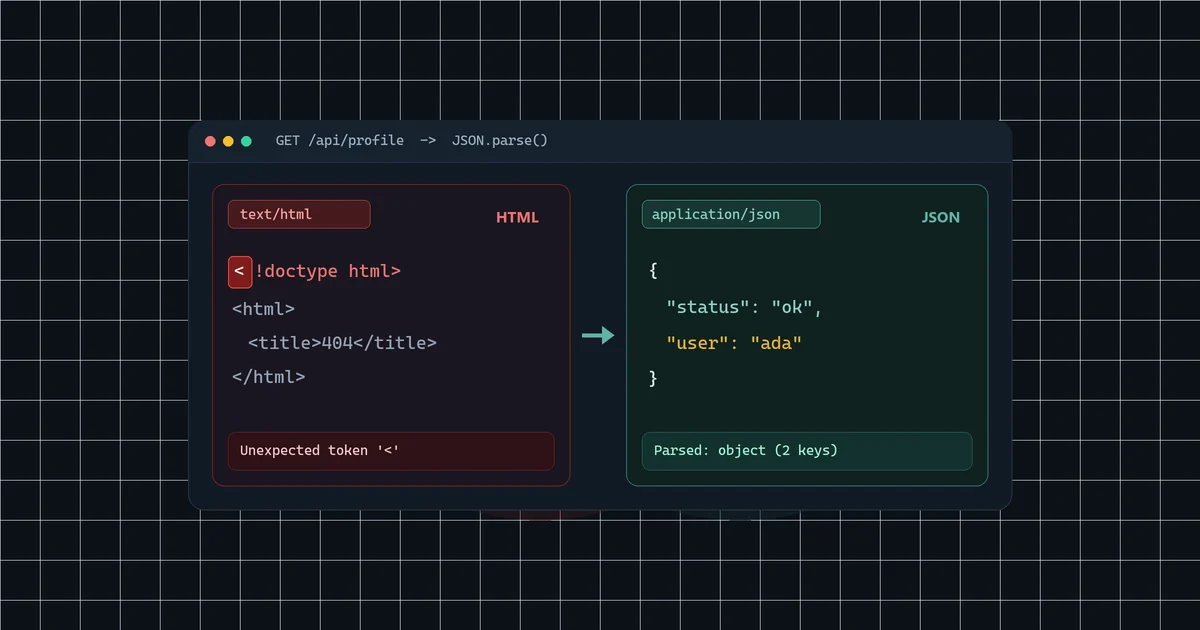
You call await response.json(), and your app crashes immediately with:
SyntaxError: Unexpected token '<' in JSON at position 0 (or in newer browsers and Node.js: Unexpected token '<', "<!doctype "... is not valid JSON).
Here is the fast answer: there is nothing wrong with your JSON parser. Your server sent back an HTML page starting with < (such as <!doctype html> or <html>), and JSON.parse() failed on the very first character.
To find out why within 30 seconds, open your browser DevTools Network tab, click the failing request, and inspect the Response preview alongside its Status and Content-Type header. If the response looks like valid JSON at first glance but still fails to parse, paste the raw payload into our JSON formatter to spot hidden syntax breaks or stray characters.
How different runtimes report the exact same bug
JavaScript engines word this error differently, though every version points to HTML arriving where JSON was expected:
| Runtime / Browser | Exact error message | What it means |
|---|---|---|
| Chrome / Edge / Node 20+ | Unexpected token '<', "<!doctype "... is not valid JSON |
Response starts with an HTML doctype |
| Older V8 / Node.js | Unexpected token < in JSON at position 0 |
First byte parsed by JSON.parse() is < |
| Firefox | JSON.parse: unexpected character at line 1 column 1 |
Line 1, column 1 holds < or non-JSON text |
| Safari / WebKit | SyntaxError: The string did not match the expected pattern. |
Non-JSON document passed to JSON parser |
1. Your fetch() call skipped response.ok
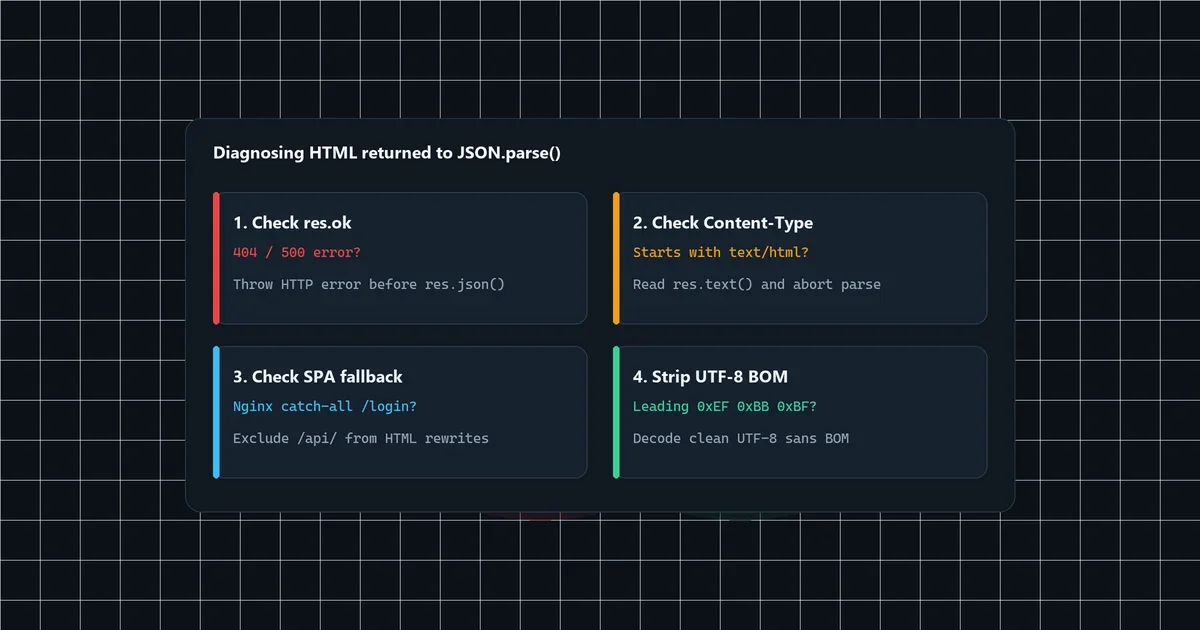
fetch() only rejects a promise when the network dies or CORS blocks the request. It resolves normally for HTTP 404, 500, and 502 responses. When your backend sends an HTML error template with status 500, calling response.json() blindly crashes your error handler before your fallback code can run.
Always guard both the status code and the Content-Type header before parsing:
async function fetchJson(url, options = {}) {
  const { headers, ...restOptions } = options;
  const res = await fetch(url, {
    ...restOptions,
    headers: { Accept: "application/json", ...headers },
  });

  const contentType = res.headers.get("content-type") || "";
  if (!res.ok) {
    const bodyText = await res.text();
    throw new Error(`HTTP ${res.status} on ${url}: ${bodyText.slice(0, 120)}`);
  }

  if (!contentType.includes("application/json")) {
    const bodyText = await res.text();
    throw new TypeError(`Expected JSON, got "${contentType}": ${bodyText.slice(0, 80)}`);
  }

  return res.json();
}
Logging the first 80 to 120 characters shows you the exact HTML <title> or server error right away instead of swallowing it inside a SyntaxError.
2. Single-page app fallback routes hijack broken API paths
React, Vue, and Vite deployments often route every unknown path back to index.html so client-side URLs keep working on refresh. When you request /api/users with a typo, or hit an endpoint your reverse proxy forgot to forward, the server returns 200 OK along with your app’s index.html.
Look at this common Nginx catch-all rule:
# Broken: missing /api/ requests silently return 200 index.html
location / {
    try_files $uri /index.html;
}

# Fixed: keep API routes strict so missing paths return a real 404
location /api/ {
    proxy_pass http://127.0.0.1:8000;
    proxy_intercept_errors off;
}

location / {
    try_files $uri $uri/ /index.html;
}
When a bad URL returns 200 OK and text/html, even if (!res.ok) won’t stop .json(). Checking contentType.includes("application/json") above catches that silent trap every time.
3. Session timeouts and auth redirects return /login HTML
API clients using cookies often hit auth middleware when a session expires. If that middleware responds with a 302 Found redirect to /login, fetch() follows the redirect silently by default and fetches the HTML login form.
Two quick fixes stop redirect pages from hitting your JSON parser:
- On the frontend: Send
Accept: application/json(andX-Requested-With: XMLHttpRequestif your backend expects it), or setredirect: "error"on internal API calls so unexpected redirects fail loudly. - On the backend: Return
401 Unauthorizedwith JSON ({"detail": "Authentication required"}) for API routes instead of redirecting to a login view.
4. Relative URLs break on nested frontend routes
Calling fetch("api/config.json") without a leading slash works on /, because the browser resolves it to /api/config.json. Once a visitor navigates to /users/42/, the same call resolves to /users/42/api/config.json, hits your page handler, and gets HTML back.
Always prefix root-relative API paths with a leading slash (/api/config.json) or resolve against an explicit base origin from your environment config. You can test your final API response body in the JSON formatter before shipping new endpoints, and if your parser throws on a line after position 0, check our guide to fixing invalid JSON trailing commas.
5. Hidden UTF-8 BOM bytes at byte zero (\uFEFF)
Occasionally a script, CSV-to-JSON export, or Windows editor saves valid JSON starting with a UTF-8 Byte Order Mark (0xEF 0xBB 0xBF). Strict parsers reject position 0 even though the file looks normal in your terminal. Running curl -i quickly reveals whether an endpoint sends valid headers vs stray bytes:
# Inspect response headers and first 120 raw bytes
curl -sS -i https://example.com/api/data | head -n 20
Save static .json fixtures as plain UTF-8 without BOM, or strip a leading \uFEFF on legacy third-party feeds before passing the string to JSON.parse().
Quick debugging checklist
- Status is
404or500: Check your backend logs and server error template; add ares.okcheck before.json(). - Status is
200withtext/html: Your SPA fallback servedindex.html, a relative URL missed/api/, or an auth wall redirected to/login. - Error occurs on Windows/PowerShell files: Re-save the JSON payload without a UTF-8 BOM.